|
Amazing techniques which will transform your use of PowerPoint presentations. Make your presentation stand out from the crowd! |
|
|||||
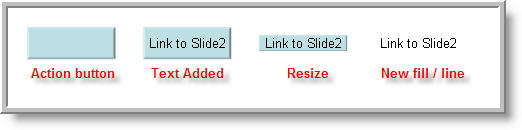
I Don't Want My Text Hyperlinks Underlined And I don't want them to change colour after I click them There's a well known solution which can work well. It's to place a 99% transparent shape over the text and link to that. Because the text is not actually linked to there is no underline or colour change. This is fine ... until you decide to change the text or colour or size. Now you need to move the transparent shape to get at the text and then move it back. This can be a real pain if you have lots of text hyperlinks. Try this instead. Insert an action button or a rectangle. Select it and create the link. Now "Add text", make sure the link is on the shape not the text! Resize the shape if necessary to fit the text and then set it to "no line" and 99% transparent fill. The text can be easily changed and no shapes to move aside!
If you would like the text to change colour after the link has been used simply add an "Emphasis" > change font colour animation and trigger it with a click on the button itself. Help with triggers in Powerpoint
|
|
|
|||
This website is sponsored by Technology Trish Ltd |
|||||